3D SMoE Splatting for Edge-aware Realtime Radiance Field Rendering
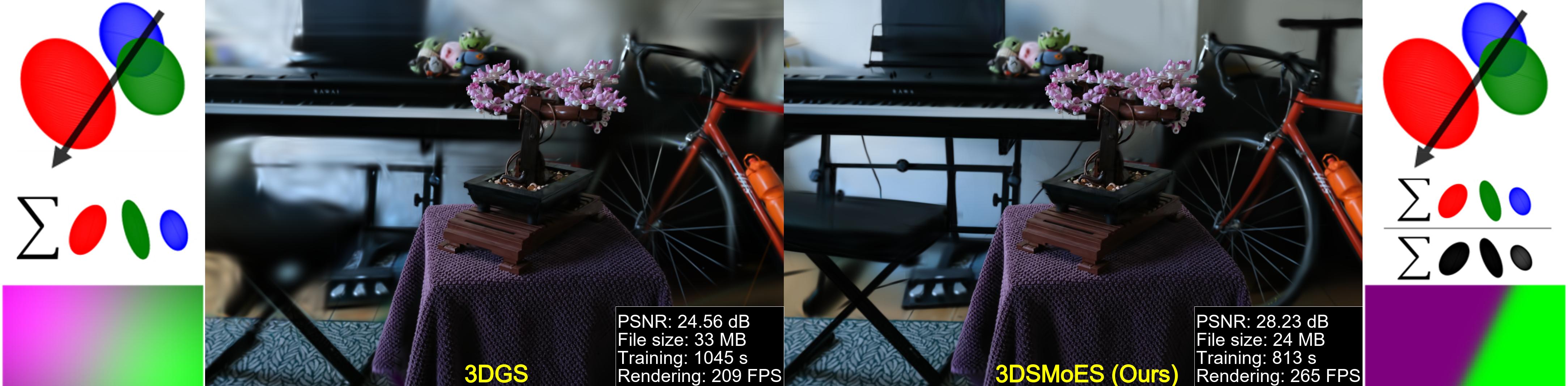
This repository provides the official implementation of the paper “3D SMoE Splatting for Edge-aware Realtime Radiance Field Rendering.” The method represents a scene using a set of Gaussian density functions and incorporates compression and densification techniques to improve compactness and efficiency.
Reproducibility
This repository provides scripts and pretrained models to reproduce representative results from the paper.
All experiments reported in the paper were conducted on the following platform:
- OS: Ubuntu 20.04 LTS
- GPU: NVIDIA A100 (40 GB VRAM)
- CUDA: 11.7
- Python: 3.9
- PyTorch: 2.0.1
Runtime
Average training time on the reference platform:
| Regime |
Training Time |
Inference Time |
| Low-rate regime |
~10 min |
~311 FPS |
| High-rate regime |
~25 min |
~103 FPS |
Pretrained Models
Pretrained checkpoints are provided to enable reproduction of results without retraining.
They can be downloaded from:
https://drive.google.com/drive/folders/13Fsx7zEgROhQW3RPiEaxnyDF9GJflFV2?usp=drive_link
These pretrained models correspond to the final optimized state (iteration 30000) for each scene and are required for rendering and metric evaluation.
The full reproduction details are provided in the section below:
Reproducing Rendered Results and Metrics (Pretrained Model)
Additional Tested Configuration
The code has also been tested on:
- GPU: NVIDIA RTX A4000 (16 GB VRAM)
- CUDA: 12.2
- Python: 3.8
- PyTorch: 2.0.1
Installation
# download
git clone https://github.com/yihsinli/3d-SMoE-Splatting.git --recursive

# if you have an environment used for 3dgs, use it
# if not, create a new environment
conda env create --file environment.yml
conda activate 3dsmoesplatting
Training and Testing
The quantitative results reported in Table I can be reproduced by training and evaluating each scene individually. All evaluation metrics are automatically computed during training and stored per scene.
Training Command
To reproduce results for a single scene:
python train.py -s <path to COLMAP or NeRF Synthetic dataset> -m <path to output folder> --init_path default
Commandline arguments for regularizations
--eval  # evaluation mode or not
--densify_until_iter # iterations for add/remove Gaussians, default = 15000
--densify_grad_threshold # Grad threshold for densification, default = 0.0002
Tips for adjusting the parameters on your own dataset:
- For compact representation, we suggest using higher threshold, i.e.,
densify_grad_threshold=0.05, for low-rate regime.
The testing results will be automatically generated in the same folder under ‘test’ folder.
During training, evaluation results for each scene are appended to a single file:
/all_results/results.json
This file contains a list of per-scene results, where each entry corresponds to one trained scene and includes all metrics reported in Table I:
- PSNR
- SSIM
- LPIPS
- additional metrics used in the paper
No separate evaluation script or post-processing is required.
### Reproducibility of Table I
Table I is obtained directly from the accumulated entries in results.json, where each scene contributes one result entry.
Output Directory Structure
```
all_results/
└── results.json
```
The file is created and updated automatically during training if it does not exist.
## Rendering
### Navigation pose generator
To export a camera pose for rendering video, simply use
```bash
python generate_pose.py -s --m --iteration 30000
```
To export a rendered result (video), simply use
```bash
python render.py -m -s --iteration 30000
```
Commandline arguments you should adjust accordingly for meshing for bounded TSDF fusion, use
```bash
## Quick Examples
Assuming you have downloaded [MipNeRF360](https://jonbarron.info/mipnerf360/), simply use
```bash
python train.py -s / -m SMoEoutput/m360/counter
# use our pose generator
python generate_pose.py -s / -m SMoEoutput/m360/counter --iteration 30000
# or use the bounded mesh extraction if you focus on foreground
python render.py -s / -m output/m360/counter --iteration 30000
```
**Custom Dataset**: We use the same COLMAP loader as 3DGS, you can prepare your data following [here](https://github.com/graphdeco-inria/gaussian-splatting?tab=readme-ov-file#processing-your-own-scenes).
## Reproducing Rendered Results and Metrics (Pretrained Model)
In addition to training-based reproduction (Table I), we provide pretrained models to directly reproduce rendering results and quantitative metrics without retraining.
### Pretrained Models
Pretrained weights are provided to enable direct evaluation.
Download them from:
https://drive.google.com/drive/folders/13Fsx7zEgROhQW3RPiEaxnyDF9GJflFV2?usp=drive_link
After downloading, the data should follow the structure below:
```
/
└── point_cloud/
└── iteration_30000/
└── point_cloud.ply
├── ...
```
### Rendering with Pretrained Models
To render a trained scene:
```bash
python render.py \
-s / \
-m output// \
--iteration 30000
```
If focusing on foreground-only reconstruction, bounded mesh extraction can be used as an alternative rendering mode.
### Metric Evaluation
After rendering, compute quantitative metrics using:
```bash
python metrics.py \
-m output// \
--iteration 30000
```
This produces PSNR, SSIM, LPIPS, and other metrics consistent with those reported in the paper.
## Acknowledgements
This project is built upon [3DGS](https://github.com/graphdeco-inria/gaussian-splatting). We thank all the authors for their great repos.
## Citation
If you find our code or paper helps, please consider citing:
```bibtex
@inproceedings{Li3DSMoE2025,
title={3D SMoE Splatting for Edge-aware Realtime Radiance Field Rendering},
author={Li, Yi-Hsin and Sikora, Thomas and Knorr, Sebastian and Sjöström, Mårten},
publisher = {Association for Computing Machinery},
booktitle = {SIGGRAPH Asia 2025 Conference Papers},
year = {2025}
}
```